Home / Work / Homelab Dashboard
Personal Project Dashboard Design Agentic UX Net-New Design

Homelab Monitoring Dashboard

Designed and built an AI-integrated monitoring dashboard from the ground up for a personal homelab server, covering 10+ self-hosted services with clear status hierarchy, real navigation, and an embedded AI command interface with explicit boundaries around what it can safely act on.

Role

Designer & Builder (Solo)

Project

Personal Homelab

Year

2026

Status

Active, Ongoing

I designed and built an AI-integrated monitoring dashboard for my personal homelab server from scratch, covering 10+ self-hosted services across media, monitoring, and infrastructure tooling. Beyond just surfacing uptime and health data, I built the dashboard around a clear information hierarchy, a consistent status system, and an embedded AI command interface that explains issues in plain language, restarts failed services on its own, and queues anything bigger for my approval.

Scope End-to-end design and build, from information architecture through AI integration
Structure Persistent navigation, a single consistent status-color system, issues sorted to the top at every level
Extension An embedded AI command interface with explicit limits on autonomous action

Monitoring dashboards fail in a specific way: they either bury the one thing that actually needs attention under a wall of identical-looking healthy services, or worse, they contradict themselves, showing a different issue count in one place than another. The second is worse: a tool that disagrees with itself stops being trusted.

I set out to design a dashboard where a single glance tells you what's wrong, where color always means the same thing everywhere it appears, and where the numbers on screen are never in tension with each other, while still capturing the personality of the "Gotham Command" theme I wanted the project to have.

I structured the information hierarchy so anything unhealthy sorts to the top, both at the category level and within a category, rather than sitting mixed in alphabetically alongside everything that's working fine. Healthy services collapse down to a status dot and a name; only services with a warning or critical status get the full detail treatment (uptime, latency, description of the issue). One status palette is used everywhere: teal for healthy, amber for warning, red for critical, with a single issue count that's never contradicted anywhere else on the page.

I built a persistent top navigation bar (Overview, Alerts, Approvals, History, Settings) and extended the dashboard with an embedded AI chat interface. The assistant, Robin, explains what's wrong in plain language and restarts failed services on its own, since a restart is low-risk and easy to undo. Anything bigger waits in the Approvals queue for me. It's also explicit about its own limits: when a service failure requires physical intervention, it says so directly rather than pretending it can help further.
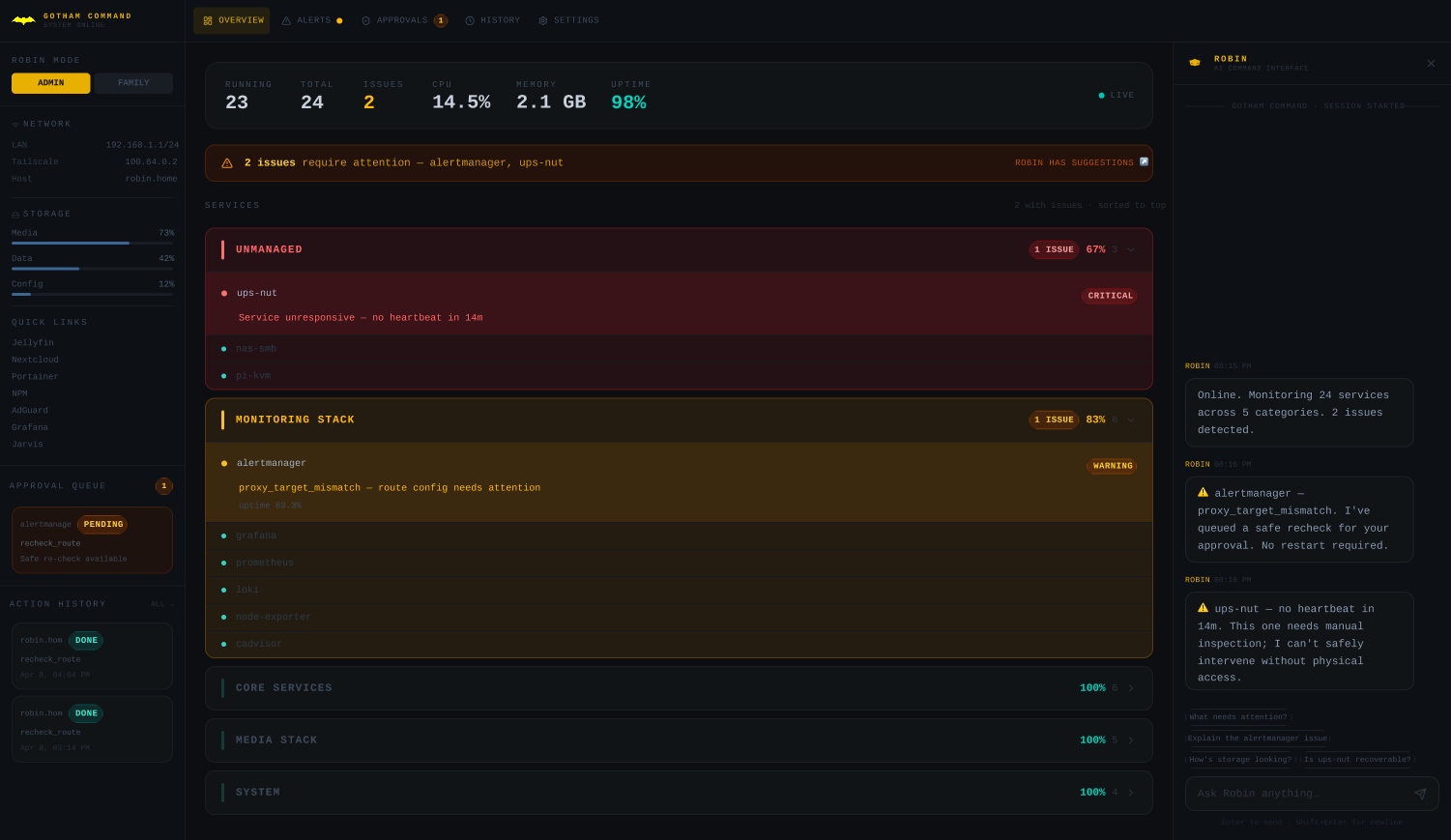
This is a self-directed personal project. I designed and built the entire dashboard end to end using Claude Code, from the information architecture and status system through the embedded AI command interface, iterating through multiple passes based on my own critique to keep tightening visual hierarchy and clarity.

The dashboard leads with what needs attention: unhealthy categories and services sort to the top, a single consistent status system is used everywhere, and a persistent nav gives direct access to Alerts, Approvals, and History. The embedded AI panel on the right surfaces the same issues in plain language and is explicit about what it can and can't safely do on its own.

Homelab monitoring dashboard with navigation, consistent status colors, and an embedded AI chat panel

Persistent navigation, a single consistent status system, issues sorted to the top at every level, and an embedded AI command interface

The dashboard gives an at-a-glance read on what actually needs attention across 10+ services, with no ambiguity in color or count, and adds an agentic layer that fixes routine failures on its own and requires my approval for anything with real consequences. It's an active, ongoing personal project I continue to build on.

Next Case Study

Modernizing a Legacy Payments Experience

→